TruSpace

Teams

Your team, your access, no waiting.

Invite members, set what each one can do, and map which properties they can see.
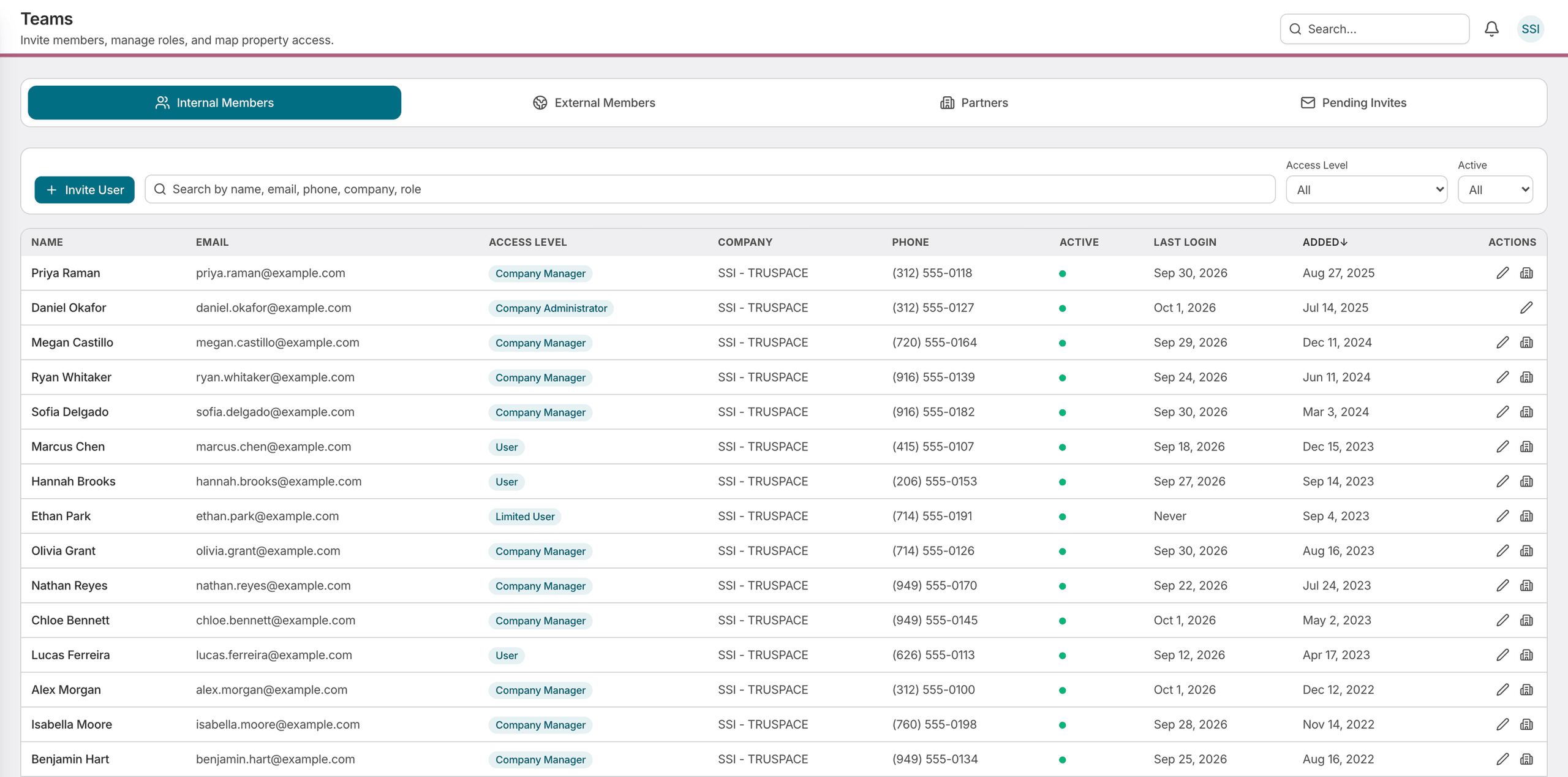
The TruSpace Teams roster: tabs for internal members, external members, partners and pending invites, an invite user action beside a search field and access-level filters, and a table giving each member's email, access level, company, phone, active state, last login and date added.

Access is yours to hand out.

Adding a colleague, changing what they can do, and mapping the properties they can see are all yours to do, at the moment you need them done.

1 of 2

Self-service invitations

Invite a team member by email and track the invitation until it is accepted, without submitting a request to anyone.

Access levels

Varied access levels allow you to bestow permissions as your team members require.

Per-property mapping

Decide which buildings each person can see, one property at a time.

Membership visibility

Who has access, at what level, when they were added, and more.

Search the roster

By name, email, phone, company, or role.

Built for the people who own the roster.

  • Property Managers

    Add a colleague and give them the buildings they work on, in the time it takes to type an email address.

  • Asset Managers

    Own the roster for your organization — who is on it, what they can do, and which properties they can see.

See Teams in action.

Schedule a walkthrough and we'll show you how invitations, access levels, and per-property mapping work on your own portfolio.